Free Tools for Graphic Design
Graphic design has become an essential skill in today’s digital world. Whether you are a student, business owner, or content creator, having access to the right tools can make a huge difference. The good news is that there are many free tools for graphic design that can help you create stunning visuals without spending money. In this blog, we will explore some of the best options available and how they can boost your creativity.

Why Choose Free Tools?
Before diving into the list, let’s understand why free tools for graphic design are so popular:
- Cost-effective for beginners and small businesses
- Easy to access and use
- No need for expensive software subscriptions
- Great for learning and skill development
These tools are perfect for anyone who wants to start designing without financial pressure.
Best Free Tools for Graphic Design
Here are some of the most popular and powerful free tools for graphic design you can start using today:
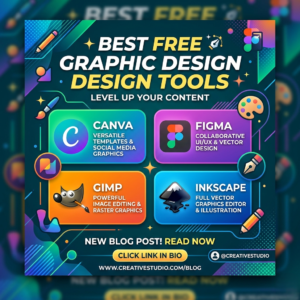
1. Canva
- User-friendly interface
- Thousands of templates available
- Perfect for social media posts, presentations, and posters
- Drag-and-drop functionality
Canva is one of the most widely used free tools for graphic design, especially for beginners.
2. GIMP (GNU Image Manipulation Program)
- Advanced photo editing features
- Similar to Photoshop in functionality
- Open-source and completely free
- Supports various plugins
If you need professional-level editing, GIMP is one of the best free tools for graphic design available.
Best 10 Free Download Premium Luxury Logo Mockup
3. Adobe Express (Free Version)
- Quick and easy design creation
- Great for branding and marketing materials
- Cloud-based access
- Includes basic templates and assets
This is another excellent option among free tools for graphic design for creating fast and polished content.
4. Figma
- Ideal for UI/UX design
- Real-time collaboration
- Works directly in your browser
- Great for team projects
Figma stands out as one of the top free tools for graphic design for designers working on web and app interfaces.
5. Inkscape
- Vector graphics editing
- Similar to Adobe Illustrator
- Great for logos and illustrations
- Open-source platform
Inkscape is a powerful choice when it comes to vector-based free tools for graphic design.
Key Features to Look For
When choosing the best free tools for graphic design, consider these features:
- Ease of use
- Template availability
- Export options (PNG, JPG, SVG, etc.)
- Customization flexibility
- Community support and tutorials
Selecting the right tool depends on your specific needs and skill level.
Tips for Using Free Tools Effectively
To get the most out of free tools for graphic design, follow these tips:
- Start with templates and customize them
- Learn basic design principles (color, typography, layout)
- Practice regularly
- Explore tutorials and online resources
- Experiment with different tools to find your favorite
Consistency and creativity are key to improving your design skills.
Conclusion
In conclusion, free tools for graphic design have made it easier than ever to create professional-quality designs without any cost. Whether you are designing for social media, business, or personal projects, these tools offer everything you need to get started. From Canva’s simplicity to GIMP’s advanced features, there is something for everyone.
If you are just starting out, try a few of these free tools for graphic design and see which one works best for you. With time and practice, you can create amazing visuals that stand out online and help you achieve your goals.
Start your design journey today and unlock your creativity with the best free tools for graphic design!